terça-feira, 14 de abril de 2020

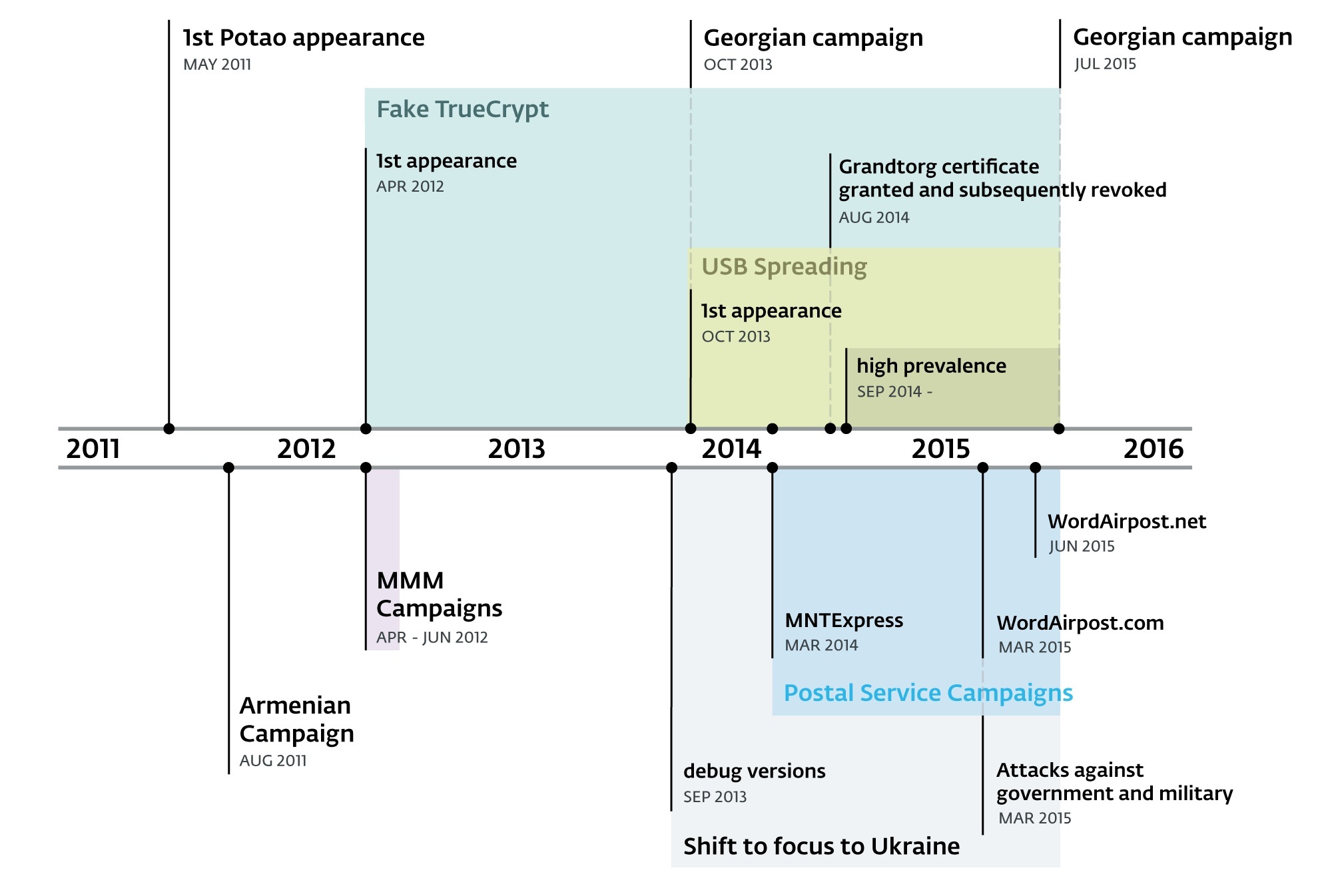
Potao Express Samples

http://www.welivesecurity.com/2015/07/30/operation-potao-express/

http://www.welivesecurity.com/wp-content/uploads/2015/07/Operation-Potao-Express_final_v2.pdf


TL; DR


2011- July 2015
  • Aka  Sapotao and node69
  • Group - Sandworm / Quedagh APT
  • Vectors - USB, exe as doc, xls
  • Victims - RU, BY, AM, GE 
  • Victims - MMM group, UA gov
  • truecryptrussia.ru has been serving modified versions of the encryption software (Win32/FakeTC) that included a backdoor to selected targets. 
  • Win32/FakeTC - data theft from encrypted drives
  • The Potao main DLL only takes care of its core functionality; the actual spying functions are implemented in the form of downloadable modules. The plugins are downloaded each time the malware starts, since they aren't stored on the hard drive.
  • 1st Full Plugin and its export function is called Plug. Full plugins run continuously until the infected system is restarted
  • 2nd Light Plugin with an export function Scan. Light plugins terminate immediately after returning a buffer with the information they harvested off the victim's machine.
  • Some of the plugins were signed with a certificate issued to "Grandtorg":
  • Traffic 
  • Strong encryption. The data sent is encapsulated using the XML-RPC protocol.
  • MethodName value 10a7d030-1a61-11e3-beea-001c42e2a08b is always present in Potao traffic.
  • After receiving the request the C&C server generates an RSA-2048 public key and signs this generated key with another, static RSA-2048 private key .
  • In 2nd stage the malware generates a symmetric AES-256 key. This AES session key is encrypted with the newly received RSA-2048 public key and sent to the C&C server.
  • The actual data exchange after the key exchange is then encrypted using symmetric cryptography, which is faster, with the AES-256 key
  • The Potao malware sends an encrypted request to the server with computer ID, campaign ID, OS version, version of malware, computer name, current privileges, OS architecture (64 or 32bits) and also the name of the current process.
  • Potao USB - uses social engineering, exe in the root disguised as drive icon
  • Potao Anti RE -  uses the MurmurHash2 algorithm for computing the hashes of the API function names.
  • Potao Anti RE - encryption of strings
  • Russian TrueCrypt Win32/FakeTC - The malicious program code within the otherwise functional TrueCrypt software runs in its own thread. This thread, created at the end of the Mount function, enumerates files on the mounted encrypted drive, and if certain conditions are met, it connects to the C&C server, ready to execute commands from the attackers.
  • IOC https://github.com/eset/malware-ioc/tree/master/potao

TypeSHA256MD5
1stVersion1fe6af3d704d2fc0c7acd58b069a31eec866668ec6e25f52354e6e61266db8db85b0e3264820008a30f17ca19332fa19
1stVersion2ff0941fe3514abc12484ad2853d22fd7cb36469a313b5ecb6ef0c6391cf78abac854a3c91d52bfc09605506e76975ae
1stVersion54a76f5cd5a32ed7d5fa78e5d8311bafc0de57a475bc2fddc23ee4b3510b9d443b7d88a069631111d5585b1b10cccc86
1stVersion76c7c67274cf5384615a120e69be3af64cc31d9c4f05ff2031120612443c8360d1658b792dd1569abc27966083f59d44
1stVersion244c181eb442fefcf1e1daf900896bee6569481c0e885e3c63efeef86cd64c550c7183d761f15772b7e9c788be601d29
1stVersion887a721254486263f1f3f25f3c677da62ef5c062c3afa7ef70c895bc8b17b424a35e48909a49334a7ebb5448a78dcff9
1stVersion945c594aee1b5bd0f3a72abe8f5a3df74fc6ca686887db5e40fe859e3fc90bb1502f35002b1a95f1ae135baff6cff836
1stVersionab8d308fd59a8db8a130fcfdb6db56c4f7717877c465be98f71284bdfccdfa25a446ced5db1de877cf78f77741e2a804
1stVersionb22a614a291111398657cf8d1fa64fa50ed9c66c66a0b09d08c53972c6536766d939a05e1e3c9d7b6127d503c025dbc4
1stVersionfcfdcbdd60f105af1362cfeb3decbbbbe09d5fc82bde6ee8dfd846b2b844f97214634d446471b9e2f55158d9ac09d0b2
DebugVersion910f55e1c4e75696405e158e40b55238d767730c60119539b644ef3e6bc32a5d7263a328f0d47c76b4e103546b648484
DebugVersionc821cb34c86ec259af37c389a8f6cd635d98753576c675882c9896025a1abc53bdc9255df5385f534fea83b497c371c8
DebugVersionf845778c3f2e3272145621776a90f662ee9344e3ae550c76f65fd954e7277d195199fcd031987834ed3121fb316f4970
Droppersfrompostalsites4dcf14c41b31f8accf9683917bfc9159b9178d6fe36227195fabc232909452af65f494580c95e10541d1f377c0a7bd49
Droppersfrompostalsites8bc189dee0a71b3a8a1767e95cc726e13808ed7d2e9546a9d6b6843cea5eb3bda4b0615cb639607e6905437dd900c059
Droppersfrompostalsites048621ecf8f25133b2b09d512bb0fe15fc274ec7cb2ccc966aeb44d7a88beb5b07e99b2f572b84af5c4504c23f1653bb
Droppersfrompostalsitesaa23a93d2fed81daacb93ea7ad633426e04fcd063ff2ea6c0af5649c6cfa03851927a80cd45f0d27b1ae034c11ddedb0
Droppersfrompostalsitesc66955f667e9045ea5591ebf9b59246ad86227f174ea817d1398815a292b8c88579ad4a596602a10b7cf4659b6b6909d
Droppersfrompostalsitesd6f126ab387f1d856672c730991573385c5746c7c84738ab97b13c897063ff4ae64eb8b571f655b744c9154d8032caef
Dropperswdecoy61dd8b60ac35e91771d9ed4f337cd63e0aa6d0a0c5a17bb28cac59b3c21c24a9d755e52ba5658a639c778c22d1a906a3
Dropperswdecoy4328b06093a4ad01f828dc837053cb058fe00f3a7fd5cfb9d1ff7feb7ebb8e32b4d909077aa25f31386722e716a5305c
Dropperswdecoy15760f0979f2ba1b4d991f19e8b59fc1e61632fcc88755a4d147c0f5d47965c5fc4b285088413127b6d827656b9d0481
Dropperswdecoyb9c285f485421177e616a148410ddc5b02e43f0af375d3141b7e829f7d487bfd73e7ee83133a175b815059f1af79ab1b
Dropperswdecoycf3b0d8e9a7d0ad32351ade0c52de583b5ca2f72e5af4adbf638c81f4ad8fbcbeebbcb1ed5f5606aec296168dee39166
Dropperswdecoydbc1b98b1df1d9c2dc8a5635682ed44a91df6359264ed63370724afa9f19c7ee5a24a7370f35dbdbb81adf52e769a442
FakeTrueCryptextractedexe4c01ffcc90e6271374b34b252fefb5d6fffda29f6ad645a879a159f78e095979b64dbe5817b24d17a0404e9b2606ad96
FakeTrueCryptextractedexe5de8c04a77e37dc1860da490453085506f8aa378fbc7d811128694d8581b89ba7ca6101c2ae4838fbbd7ceb0b2354e43
FakeTrueCryptextractedexe73aae05fab96290cabbe4b0ec561d2f6d79da71834509c4b1f4b9ae714159b42f64704ed25f4c728af996eee3ee85411
FakeTrueCryptextractedexec7212d249b5eb7e2cea948a173ce96e1d2b8c44dcc2bb1d101dce64bb3f5beccc1f715ff0afc78af81d215d485cc235c
FakeTrueCryptSetup42028874fae37ad9dc89eb37149ecb1e6439869918309a07f056924c1b981deff34b77f7b2233ee6f727d59fb28f438a
FakeTrueCryptSetupa3a43bbc69e24c0bc3ab06fbf3ccc35cf8687e2862f86fb0d269258b68c710c9babd17701cbe876149dc07e68ec7ca4f
FakeTrueCryptSetupb8844e5b72971fe67d2905e77ddaa3366ae1c3bead92be6effd58691bc1ff8eccfc8901fe6a9a8299087bfc73ae8909e
FakeTrueCryptSetupfe3547f0e052c71f872bf09cdc1654137ee68f878fc6d5a78df16a13e6de176883f3ec97a95595ebe40a75e94c98a7bd
OtherDroppers2de76a3c07344ce322151dbb42febdff97ade8176466a3af07e5280bd859a18638e708fea8016520cb25d3cb933f2244
OtherDroppers4e88b8b121d768c611fe16ae1f008502b2191edc6f2ee84fef7b12b4d86fe000360df4c2f2b99052c07e08edbe15ab2c
OtherDroppers29dfc81b400a1400782623c618cb1d507f5d17bb13de44f123a333093648048f89a3ea3967745e04199ebf222494452e
OtherDroppers97afe4b12a9fed40ad20ab191ba0a577f5a46cbfb307e118a7ae69d04adc2e2d6ba88e8e74b12c914483c026ae92eb42
OtherDroppers793a8ce811f423dfde47a5f44ae50e19e7e41ad055e56c7345927eac951e966b043f99a875424ca0023a21739dba51ef
OtherDroppers904bb2efe661f654425e691b7748556e558a636d4f25c43af9d2d4dfbe83262e02d438df779affddaf02ca995c60cecb
OtherDroppersb62589ee5ba94d15edcf8613e3d57255dd7a12fce6d2dbd660fd7281ce6234f411b4e7ea6bae19a29343ae3ff3fb00ca
OtherDroppersd2c11706736fda2b178ac388206472fd8d050e0f13568c84b37683423acd155d27d74523b182ae630c4e5236897e11f3
OtherDroppersf1f61a0f9488be3925665f8063006f90fab1bf0bd0b6ff5f7799f8995ff8960e1ab8d45656e245aca4e59aa0519f6ba0
USBSpreaders1acae7c11fb559b81df5fc6d0df0fe502e87f674ca9f4aefc2d7d8f828ba7f5c76dda7ca15323fd658054e0550149b7b
USBSpreaders3d78f52fa0c08d8bf3d42074bf76ee56aa233fb9a6bc76119998d085d94368caca1a3618088f91b8fb2a30c9a9aa4aca
USBSpreaders7d15bd854c1dfef847cdd3caabdf4ab81f2410ee5c7f91d377cc72eb81135ff4a2bb01b764491dd61fa3a7ba5afc709c
USBSpreaders09c04206b57bb8582faffb37e4ebb6867a02492ffc08268bcbc717708d1a8919a59053cc3f66e72540634eb7895824ac
USBSpreaders12bb18fa9a12cb89dea3733b342940b80cd453886390079cb4c2ffcd664baeda2bd0d2b5ee4e93717ea71445b102e38e
USBSpreaders34e6fb074284e58ca80961feda4fe651d6d658077914a528a4a6efa91ecc749d057028e46ea797834da401e4db7c860a
USBSpreaders90b20b1687909c2f76f750ba3fd4b14731ce736c08c3a8608d28eae3f4cd68f3514423670de210f13092d6cb8916748e
USBSpreaders93accb71bf4e776955756c76990298decfebe4b1dd9fbf9d368e81dc1cb9532dabb9f4fab64dd7a03574abdd1076b5ea
USBSpreaders99a09ad92cc1a2564f3051057383cb6268893bc4a62903eabf3538c6bfb3aa9c542b00f903f945ad3a9291cb0af73446
USBSpreaders339a5199e6d0b5f781b08b2ca0ad0495e75e52b8e2fd69e1d970388fbca7a0d6a427ff7abb17af6cf5fb70c49e9bf4e1
USBSpreaders340b09d661a6ac45af53c348a5c1846ad6323d34311e66454e46c1d38d53af8b2646f7159e1723f089d63e08c8bfaffb
USBSpreaders461dd5a58ffcad9fffba9181e234f2e0149c8b8ba28c7ea53753c74fdfa0b0d5609abb2a86c324bbb9ba1e253595e573
USBSpreaders4688afcc161603bfa1c997b6d71b9618be96f9ff980e5486c451b1cc2c5076cbae552fc43f1ba8684655d8bf8c6af869
USBSpreaders7492e84a30e890ebe3ca5140ad547965cc8c43f0a02f66be153b038a73ee53141234bf4f0f5debc800d85c1bd2255671
USBSpreaders61862a55dcf8212ce9dd4a8f0c92447a6c7093681c592eb937a247e38c8109d4e685ea8b37f707f3706d7281b8f6816a
USBSpreaders95631685006ac92b7eb0755274e2a36a3c9058cf462dd46f9f4f66e8d67b9db29179f4683ece450c1ac7a819b32bdb6d
USBSpreadersb8b02cc57e45bcf500b433806e6a4f8af7f0ac0c5fc9adfd11820eebf4eb5d79cdc60eb93b594fb5e7e5895e2b441240
USBSpreaderse57eb9f7fdf3f0e90b1755d947f1fe7bb65e67308f1f4a8c25bc2946512934b739b67cc6dae5214328022c44f28ced8b
USBSpreaderse3892d2d9f87ea848477529458d025898b24a6802eb4df13e96b0314334635d03813b848162261cc5982dd64c741b450
USBSpreadersf1d7e36af4c30bf3d680c87bbc4430de282d00323bf8ae9e17b04862af28673635724e234f6258e601257fb219db9079


Continue reading


  1. Tools For Hacker
  2. Hacker Tools 2019
  3. Hacking Tools For Kali Linux
  4. Pentest Tools Framework
  5. Hackers Toolbox
  6. Nsa Hacker Tools
  7. World No 1 Hacker Software
  8. Free Pentest Tools For Windows
  9. Install Pentest Tools Ubuntu
  10. Hack Tools
  11. Hack App
  12. Hack Website Online Tool
  13. Github Hacking Tools
  14. Pentest Tools Bluekeep
  15. Pentest Tools Online
  16. Tools 4 Hack
  17. Easy Hack Tools
  18. Hacker Tools 2019
  19. Hacker Tools Github
  20. Pentest Tools Bluekeep
  21. Hack And Tools
  22. Blackhat Hacker Tools
  23. Best Pentesting Tools 2018
  24. Hacker Tool Kit
  25. Hacker Tools For Ios
  26. Termux Hacking Tools 2019
  27. Best Pentesting Tools 2018
  28. Hacking Tools For Games

Scanning For Padding Oracles

As you might have heard, we recently got our paper on padding oracle attacks accepted to the USENIX Security Conference. In this paper, we describe and evaluate a scanning methodology with which we found several padding oracle vulnerabilities in devices from various vendors. In total, we found that 1.83% of the Alexa Top 1 Million have padding oracle vulnerabilities.

To test whether a server is vulnerable, we specified different padding oracle vectors which we send to the system under test, using different cipher suites and protocol versions. If the server does not behave identically (on both the TLS and TCP layers), we consider it to be vulnerable to a padding oracle attack, since it is leaking information about the plaintext via behavior differences. Depending on the responses to such padding oracle vectors, one can estimate which implementation is responsible for the vulnerability. We contacted quite a few website owners and tried to cooperate with them, to find out which vendors and TLS stacks are responsible for the identified vulnerabilities. You can find our current disclosure status on this issue on https://github.com/RUB-NDS/TLS-Padding-Oracles.
We are currently in contact with other vendors to fix the remaining vulnerabilities, but the some of the rare (in terms of the number of affected hosts) vulnerabilities are currently not attributed. To fix the remaining vulnerabilities, we ask for your assistance to help get rid of this issue. For this purpose, we integrated a standalone version of our padding oracle evaluation tool into our TLS-Scanner (v.2.7) project. This tool allows you (among other things) to evaluate if a specific server is vulnerable.

When the tool detects a vulnerability, it tries to attribute the vulnerability to a specific vendor or CVE. If we already know of the vulnerability of the server you scanned, the tool will print its details. If the tool does not have a description of the vulnerability in its database, it will ask you to notify us about the vulnerable server, such that we can notify the vendor and get the device fixed. To be clear: the tool never sends any data to us - you have the choice of whether to notify us (and what details to include). There is a chance that the tool's attribution is also mistaken, that is, the tool lists a vendor for your host, but you know for sure that you do not use an implementation by this vendor. Please contact us in such cases as well.

How to use the Tool

First, you need to grab hold of the tool. There are 3 ways to get your hands dirty: pre-compiled, self-compiled or Docker. We provide a pre-compiled version of the tool since the compilation process can get quite messy if you are not familiar with java and maven. You can directly download the resulting project here. However, if you also want to play around with the code, you have to compile everything yourself.

Building the TLS-Scanner

For this, you will need (Git), maven (sudo apt-get install maven), OpenJDK-8  (I can guarantee that this version works, other versions might work as well, have not tested it).

You will need to get TLS-Attacker 2.9 (if you do not already have it):
Now we can clone and install the TLS-Scanner

Docker

We also provide a Dockerfile, which lets you run the scanner directly

Getting Started


If you start the TLS-Scanner you should be greeted by a usage info, similar to the one below:

 or


This should give you an overview of the supported command line flags. The only really required one is the -connect flag (similar to OpenSSL and TLS-Attacker), with which you specify which host to scan. The most basic command is therefore:

Your output may look something like this:

By default, TLS-Scanner will run single-threaded. In such cases the scanning will take a while; just how long it will take depends on your server configuration. The scanner also supports multi-threading, which drastically improves the performance. There are two parameters to play around with, -threads, which controls how many different "probes" are executed in parallel, and -aggressive , which controls how many handshakes can be executed simultaneously. If you want the fastest results the following parameters are usually a good choice:

But lets get back to the results of the Scanner. Currently the Scanner supports a bunch of well known tests, like supported ciphersuites or protocol versions. These are very similar to what you may be used to from other scanners like ssllabs or testssl.sh.

Padding Oracles

The main advantage of our scanner is the ability to scan for padding oracle vulnerabilities (which is probably why you are reading this post). You will see if you are vulnerable in the "Attack Vulnerabilities" section. For example, when scanning hackmanit.de, the result is false. Good for us! But as you might have seen there is also another section in the scanner report:"PaddingOracle Responsemap"
This section lists the responses of the scanned host for each padding oracle vector, for each cipher suite and protocol version. For hackmanit.de, there is no detected difference in responses, which means hackmanit.de is not vulnerable to the attack:
If we want, we can also look at the concrete responses of the server. For this purpose, we start the scanner with the -reportDetail flag:

With this flag we now get the following details:

So what does this all mean? First of all, we named our malformed records. The interpretation of those names is visualized in the following table:
BasicMac-<position>-<XOR>  A Record with ApplicationData, MAC and padding bytes, where the padding byte at <position> is XOR'd <XOR>
 MissingMacByteFirst A Record without ApplicationData, where the first byte of the MAC is missing
 MissingMacByteLast A Record without ApplicationData, where the last byte of the MAC is missing
 Plain FF A Record without ApplicationData & MAC which only contains Paddingbytes: 64* 0xFF 
 Plain 3F A Record without ApplicationData & MAC which only contains Paddingbytes: 64* 0xF3
 InvPadValMac-[<position>]-<appDataLength>-<paddingBytes> A Record with invalid padding and valid MAC. The Record contains <appDataLength> many ApplicationData bytes and <paddingBytes> many PaddingBytes. The Padding is invalid at <position>.
 ValPadInvMac-[<position>]-<appDataLength>-<paddingBytes> A Record with valid padding and invalid MAC. The Record contains <appDataLength> many ApplicationData bytes and <paddingBytes> many PaddingBytes. The MAC is invalid at <position>.
 InvPadInvMac-[<position>]-<appDataLength>-<paddingBytes> A Record with invalid padding and invalid MAC. The Record contains <appDataLength> many ApplicationData bytes and <paddingBytes> many PaddingBytes. The MAC is invalid at the first position. The Padding is invalid at <position>.

Next to the name you can see what the actual response from the server was. Alert messages which are in [] brackets indicate that the alert was a fatal alert while () brackets indicate a warning alert. ENC means that the messages were encrypted (which is not always the case). The last symbol in each line indicates the state of the socket. An X represents a closed socket with a TCP FIN, a T indicates that the socket was still open at the time of measurement and an @ indicates that the socket was closed with an RST. So how did Hackmanit respond? We see a [BAD_RECORD_MAC]  ENC X, which means we received an ENCrypted FATAL BAD_RECORD_MAC alert, and the TCP connection was closed with a TCP FIN. If a server appears to be vulnerable, the scanner will execute the scan a total of three times to confirm the vulnerability. Since this response is identical to all our vectors, we know that the server was not vulnerable and the scanner is not re-executing the workflows.

Here is an example of a vulnerable host:
As you can see, this time the workflows got executed multiple times, and the scanner reports the cipher suite and version as vulnerable because of "SOCKET_STATE". This means that in some cases the socket state revealed information about the plaintext. If you look closely, you can see that for ValPadInvMac-[0]-0-59, ValPadInvMac-[8]-0-59 and ValPadInvMac-[15]-0-59 the server failed to close the TCP socket, while for all other vectors the TCP connect was closed with a TCP FIN. The server was therefore vulnerable.

Since the server was vulnerable, TLS-Scanner will also print an additional section: "PaddingOracle Details"

In this section we try to identify the vulnerability. In the example above, TLS-Scanner will print the following:

As you can see, we attribute this vulnerability to OpenSSL <1.0.2r. We do so by looking at the exact responses to our malformed records. We additionally print two important facts about the vulnerability: Whether it is observable and its strength. The precise details of these properties are beyond the scope of this blogpost, but the short version is:
If an oracle is observable, a man in the middle attacker can see the differences between the vectors by passively observing the traffic, without relying on browser or application specific tricks. A strong oracle has no limitations in the number of consecutive bytes an attacker can decrypt. If an oracle is STRONG and OBSERVABLE, then an attacker can realistically exploit it. This is the case in the example above.
For more details on this, you will have to wait for the paper.

Attribution

As you can see, we try to fingerprint the responsible device/implementation. However, we were not able to identify all vulnerable implementations yet. If we cannot attribute a vulnerability you will receive the following message:

Could not identify the vulnerability. Please contact us if you know which software/hardware is generating this behavior.

If you encounter this message, we do not know yet who is responsible for this padding oracle and would be happy to know which device/vendor is responsible. If you know who is, please contact us so that we can get in contact with the vendor to fix the issue. To reiterate, the tool never sends any data back to us, and it is your choice whether to contact us manually or not.

There are also some cases in which we can identify the vendor, but the vendor has not patched the vulnerability yet. If you encounter such a host, the scanner will tell you that we know the responsible vendor. To prevent abuse, we do not include further details.

Non-Determinism and Errors

In some cases, the scanner is unable to scan for padding oracles and reports ERROR or non-deterministic responses. The ERROR cases appear if the scanner failed could not handshake with the specified cipher suite and protocol version. This might be due to a bug in the tested TLS-Server or a bug in TLS-Attacker or TLS-Scanner. If you think the handshake fails because of an issue on our side, please open an issue on Github, and we will investigate. The more interesting cases are the non-deterministic ones. In such cases the scanner observed non-identical scan results in three separate scans. This can be due to non-determinism in the software, connection errors, server load or non-homogeneous load balancing. Currently, you will have to analyze these cases manually. In the paper, we excluded such hosts from our study because we did not want to artificially improve our results. But we understand that you as a tester want to know if the server is vulnerable or not. If the server is not truly vulnerable you would see the differences between the answers spread across all the different vectors. If the differences only appear on a subset of malformed records the server is very likely vulnerable. If you are unsure, you can also always scan multiple times (or scan slowly), increase the timeout, or if you are entirely lost get in touch with us. 


How YOU can help

Please use the scanner on all your hosts and check for padding oracle vulnerabilities. If the scanner can identify your vulnerability, a patch should already be available. Please patch your system! If the scanner does not identify the vulnerability (and instructs you to contact us), please contact us with the details (robert.merget@rub.de). If you can provide us with the detailed output of the scanner or even better, the name of the host, with the corresponding vendor, we could match the results with our database and help fix the issue. We can already attribute over 90% of the vulnerabilities, but there is still a lot to be discovered. We mostly scanned the Alexa top 1-million on port 443. Other protocols like IMAPS, POP3S, etc. might have different implementations with different vulnerabilities. If you find vulnerabilities with our tool, please give us credit. It helps us to get more funding for our project.

Issues with the Scanner


A notable feature of our scanner is that we do not actively try to avoid intolerances (like not scanning with a lot of cipher suites in the Hello messages etc.). We believe that doing so would hide important bugs. We are currently experimenting with intolerances checks, but the feature is now still in beta. If we cannot scan a server (most of the time due to intolerances or SNI problems), the scanner will report a lot of intolerances and usually no supported protocol versions. Some intolerances may trick the scanner into reporting false results. At the current stage, we cannot make any guarantees. If you are using this tool during a pentest, it might be smart to rescan with other scanners (like the recently released padcheck tool from our colleague Craig Young) to find the ground truth (this is good advice in general, since other mainstream scanners likely have the same issues). Note however that it is very unlikely that the scanner reports a false positive on a padding oracle scan.


Conclusion

There are still a lot of padding oracle vulnerabilities out there - and a lot of them are still unpatched. We hope you will find some bugs with the tool :) Happy H4cking :D


Acknowlegements

This is joint work from Robert Merget (@ic0nz1), Juraj Somorovsky (@jurajsomorovsky),  Nimrod Aviram (@NimrodAviram), Janis Fliegenschmidt (@JanisFliegens), Craig Young (@craigtweets), Jörg Schwenk (@JoergSchwenk) and (Yuval Shavitt).
More info
  1. Hacker Techniques Tools And Incident Handling
  2. Hack Tools For Pc
  3. Pentest Tools Download
  4. Hack Tools For Games
  5. Tools Used For Hacking
  6. Pentest Tools For Windows
  7. Hacking Tools Online
  8. Android Hack Tools Github
  9. Github Hacking Tools
  10. Hacker Tools For Pc
  11. Beginner Hacker Tools
  12. Hacking Tools Software
  13. Hacker Tools Free Download
  14. Best Hacking Tools 2020
  15. Physical Pentest Tools
  16. Hack Apps
  17. Hacker Tools Free
  18. Pentest Tools Review
  19. Wifi Hacker Tools For Windows
  20. Hacking Tools Kit
  21. Nsa Hack Tools
  22. Hacker Tools Linux
  23. Hacker Tools

What Is Cybersecurity And Thier types?Which Skills Required To Become A Top Cybersecurity Expert ?

What is cyber security in hacking?

The term cyber security  refers to the technologies  and processes designed  to  defend computer system, software, networks & user data from unauthorized access, also from threats distributed through the internet by cybercriminals,terrorist groups of hacker.

Main types of cybersecurity are
Critical infrastructure security
Application security
Network Security 
Cloud Security 
Internet of things security.
These are the main types of cybersecurity used by cybersecurity expert to any organisation for safe and protect thier data from hack by a hacker.

Top Skills Required to become Cybersecurity Expert-

Problem Solving Skills
Communication Skill
Technical Strength & Aptitude
Desire to learn
Attention to Detail 
Knowledge of security across various platforms
Knowledge of Hacking
Fundamental Computer Forensic Skill.
These skills are essential for become a cybersecurity expert. 
Cyber cell and IT cell these are the department  in our india which provide cybersecurity and looks into the matters related to cyber crimes to stop the crime because in this digitilization world cyber crime increasing day by day so our government of india also takes the immediate action to prevent the cybercrimes with the help of these departments and also arrest the victim and file a complain against him/her with the help of cyberlaw in our constitution.


More info


Fluxion - Set Up Fake AP, Fake DNS, And Create Captive Portal To Trick Users Into Giving You Their Password


Fluxion is a security auditing and social-engineering research tool. It is a remake of linset by vk496 with (hopefully) less bugs and more functionality. The script attempts to retrieve the WPA/WPA2 key from a target access point by means of a social engineering (phishing) attack. It's compatible with the latest release of Kali (rolling). Fluxion's attacks' setup is mostly manual, but experimental auto-mode handles some of the attacks' setup parameters. Read the FAQ before requesting issues.
If you need quick help, fluxion is also avaible on gitter. You can talk with us on Gitter or on Discord.

Installation
Read here before you do the following steps.
Download the latest revision
git clone --recursive git@github.com:FluxionNetwork/fluxion.git
Switch to tool's directory
cd fluxion 
Run fluxion (missing dependencies will be auto-installed)
./fluxion.sh
Fluxion is also available in arch
cd bin/arch
makepkg
or using the blackarch repo
pacman -S fluxion

Changelog
Fluxion gets weekly updates with new features, improvements, and bugfixes. Be sure to check out the changelog here.

How it works
  • Scan for a target wireless network.
  • Launch the Handshake Snooper attack.
  • Capture a handshake (necessary for password verification).
  • Launch Captive Portal attack.
  • Spawns a rogue (fake) AP, imitating the original access point.
  • Spawns a DNS server, redirecting all requests to the attacker's host running the captive portal.
  • Spawns a web server, serving the captive portal which prompts users for their WPA/WPA2 key.
  • Spawns a jammer, deauthenticating all clients from original AP and lureing them to the rogue AP.
  • All authentication attempts at the captive portal are checked against the handshake file captured earlier.
  • The attack will automatically terminate once a correct key has been submitted.
  • The key will be logged and clients will be allowed to reconnect to the target access point.
  • For a guide to the Captive Portal attack, read the Captive Portal attack guide

Requirements
A Linux-based operating system. We recommend Kali Linux 2 or Kali rolling. Kali 2 & rolling support the latest aircrack-ng versions. An external wifi card is recommended.

Related work
For development I use vim and tmux. Here are my dotfiles

Credits
  1. l3op - contributor
  2. dlinkproto - contributor
  3. vk496 - developer of linset
  4. Derv82 - @Wifite/2
  5. Princeofguilty - @webpages and @buteforce
  6. Photos for wiki @http://www.kalitutorials.net
  7. Ons Ali @wallpaper
  8. PappleTec @sites
  9. MPX4132 - Fluxion V3

Disclaimer
  • Authors do not own the logos under the /attacks/Captive Portal/sites/ directory. Copyright Disclaimer Under Section 107 of the Copyright Act 1976, allowance is made for "fair use" for purposes such as criticism, comment, news reporting, teaching, scholarship, and research.
  • The usage of Fluxion for attacking infrastructures without prior mutual consent could be considered an illegal activity, and is highly discouraged by its authors/developers. It is the end user's responsibility to obey all applicable local, state and federal laws. Authors assume no liability and are not responsible for any misuse or damage caused by this program.

Note
  • Beware of sites pretending to be related with the Fluxion Project. These may be delivering malware.
  • Fluxion DOES NOT WORK on Linux Subsystem For Windows 10, because the subsystem doesn't allow access to network interfaces. Any Issue regarding the same would be Closed Immediately

Links
Fluxion website: https://fluxionnetwork.github.io/fluxion/
Discord: https://discordapp.com/invite/G43gptk
Gitter: https://gitter.im/FluxionNetwork/Lobby


Continue reading

segunda-feira, 13 de abril de 2020

Scanning For Padding Oracles

As you might have heard, we recently got our paper on padding oracle attacks accepted to the USENIX Security Conference. In this paper, we describe and evaluate a scanning methodology with which we found several padding oracle vulnerabilities in devices from various vendors. In total, we found that 1.83% of the Alexa Top 1 Million have padding oracle vulnerabilities.

To test whether a server is vulnerable, we specified different padding oracle vectors which we send to the system under test, using different cipher suites and protocol versions. If the server does not behave identically (on both the TLS and TCP layers), we consider it to be vulnerable to a padding oracle attack, since it is leaking information about the plaintext via behavior differences. Depending on the responses to such padding oracle vectors, one can estimate which implementation is responsible for the vulnerability. We contacted quite a few website owners and tried to cooperate with them, to find out which vendors and TLS stacks are responsible for the identified vulnerabilities. You can find our current disclosure status on this issue on https://github.com/RUB-NDS/TLS-Padding-Oracles.
We are currently in contact with other vendors to fix the remaining vulnerabilities, but the some of the rare (in terms of the number of affected hosts) vulnerabilities are currently not attributed. To fix the remaining vulnerabilities, we ask for your assistance to help get rid of this issue. For this purpose, we integrated a standalone version of our padding oracle evaluation tool into our TLS-Scanner (v.2.7) project. This tool allows you (among other things) to evaluate if a specific server is vulnerable.

When the tool detects a vulnerability, it tries to attribute the vulnerability to a specific vendor or CVE. If we already know of the vulnerability of the server you scanned, the tool will print its details. If the tool does not have a description of the vulnerability in its database, it will ask you to notify us about the vulnerable server, such that we can notify the vendor and get the device fixed. To be clear: the tool never sends any data to us - you have the choice of whether to notify us (and what details to include). There is a chance that the tool's attribution is also mistaken, that is, the tool lists a vendor for your host, but you know for sure that you do not use an implementation by this vendor. Please contact us in such cases as well.

How to use the Tool

First, you need to grab hold of the tool. There are 3 ways to get your hands dirty: pre-compiled, self-compiled or Docker. We provide a pre-compiled version of the tool since the compilation process can get quite messy if you are not familiar with java and maven. You can directly download the resulting project here. However, if you also want to play around with the code, you have to compile everything yourself.

Building the TLS-Scanner

For this, you will need (Git), maven (sudo apt-get install maven), OpenJDK-8  (I can guarantee that this version works, other versions might work as well, have not tested it).

You will need to get TLS-Attacker 2.9 (if you do not already have it):
Now we can clone and install the TLS-Scanner

Docker

We also provide a Dockerfile, which lets you run the scanner directly

Getting Started


If you start the TLS-Scanner you should be greeted by a usage info, similar to the one below:

 or


This should give you an overview of the supported command line flags. The only really required one is the -connect flag (similar to OpenSSL and TLS-Attacker), with which you specify which host to scan. The most basic command is therefore:

Your output may look something like this:

By default, TLS-Scanner will run single-threaded. In such cases the scanning will take a while; just how long it will take depends on your server configuration. The scanner also supports multi-threading, which drastically improves the performance. There are two parameters to play around with, -threads, which controls how many different "probes" are executed in parallel, and -aggressive , which controls how many handshakes can be executed simultaneously. If you want the fastest results the following parameters are usually a good choice:

But lets get back to the results of the Scanner. Currently the Scanner supports a bunch of well known tests, like supported ciphersuites or protocol versions. These are very similar to what you may be used to from other scanners like ssllabs or testssl.sh.

Padding Oracles

The main advantage of our scanner is the ability to scan for padding oracle vulnerabilities (which is probably why you are reading this post). You will see if you are vulnerable in the "Attack Vulnerabilities" section. For example, when scanning hackmanit.de, the result is false. Good for us! But as you might have seen there is also another section in the scanner report:"PaddingOracle Responsemap"
This section lists the responses of the scanned host for each padding oracle vector, for each cipher suite and protocol version. For hackmanit.de, there is no detected difference in responses, which means hackmanit.de is not vulnerable to the attack:
If we want, we can also look at the concrete responses of the server. For this purpose, we start the scanner with the -reportDetail flag:

With this flag we now get the following details:

So what does this all mean? First of all, we named our malformed records. The interpretation of those names is visualized in the following table:
BasicMac-<position>-<XOR>  A Record with ApplicationData, MAC and padding bytes, where the padding byte at <position> is XOR'd <XOR>
 MissingMacByteFirst A Record without ApplicationData, where the first byte of the MAC is missing
 MissingMacByteLast A Record without ApplicationData, where the last byte of the MAC is missing
 Plain FF A Record without ApplicationData & MAC which only contains Paddingbytes: 64* 0xFF 
 Plain 3F A Record without ApplicationData & MAC which only contains Paddingbytes: 64* 0xF3
 InvPadValMac-[<position>]-<appDataLength>-<paddingBytes> A Record with invalid padding and valid MAC. The Record contains <appDataLength> many ApplicationData bytes and <paddingBytes> many PaddingBytes. The Padding is invalid at <position>.
 ValPadInvMac-[<position>]-<appDataLength>-<paddingBytes> A Record with valid padding and invalid MAC. The Record contains <appDataLength> many ApplicationData bytes and <paddingBytes> many PaddingBytes. The MAC is invalid at <position>.
 InvPadInvMac-[<position>]-<appDataLength>-<paddingBytes> A Record with invalid padding and invalid MAC. The Record contains <appDataLength> many ApplicationData bytes and <paddingBytes> many PaddingBytes. The MAC is invalid at the first position. The Padding is invalid at <position>.

Next to the name you can see what the actual response from the server was. Alert messages which are in [] brackets indicate that the alert was a fatal alert while () brackets indicate a warning alert. ENC means that the messages were encrypted (which is not always the case). The last symbol in each line indicates the state of the socket. An X represents a closed socket with a TCP FIN, a T indicates that the socket was still open at the time of measurement and an @ indicates that the socket was closed with an RST. So how did Hackmanit respond? We see a [BAD_RECORD_MAC]  ENC X, which means we received an ENCrypted FATAL BAD_RECORD_MAC alert, and the TCP connection was closed with a TCP FIN. If a server appears to be vulnerable, the scanner will execute the scan a total of three times to confirm the vulnerability. Since this response is identical to all our vectors, we know that the server was not vulnerable and the scanner is not re-executing the workflows.

Here is an example of a vulnerable host:
As you can see, this time the workflows got executed multiple times, and the scanner reports the cipher suite and version as vulnerable because of "SOCKET_STATE". This means that in some cases the socket state revealed information about the plaintext. If you look closely, you can see that for ValPadInvMac-[0]-0-59, ValPadInvMac-[8]-0-59 and ValPadInvMac-[15]-0-59 the server failed to close the TCP socket, while for all other vectors the TCP connect was closed with a TCP FIN. The server was therefore vulnerable.

Since the server was vulnerable, TLS-Scanner will also print an additional section: "PaddingOracle Details"

In this section we try to identify the vulnerability. In the example above, TLS-Scanner will print the following:

As you can see, we attribute this vulnerability to OpenSSL <1.0.2r. We do so by looking at the exact responses to our malformed records. We additionally print two important facts about the vulnerability: Whether it is observable and its strength. The precise details of these properties are beyond the scope of this blogpost, but the short version is:
If an oracle is observable, a man in the middle attacker can see the differences between the vectors by passively observing the traffic, without relying on browser or application specific tricks. A strong oracle has no limitations in the number of consecutive bytes an attacker can decrypt. If an oracle is STRONG and OBSERVABLE, then an attacker can realistically exploit it. This is the case in the example above.
For more details on this, you will have to wait for the paper.

Attribution

As you can see, we try to fingerprint the responsible device/implementation. However, we were not able to identify all vulnerable implementations yet. If we cannot attribute a vulnerability you will receive the following message:

Could not identify the vulnerability. Please contact us if you know which software/hardware is generating this behavior.

If you encounter this message, we do not know yet who is responsible for this padding oracle and would be happy to know which device/vendor is responsible. If you know who is, please contact us so that we can get in contact with the vendor to fix the issue. To reiterate, the tool never sends any data back to us, and it is your choice whether to contact us manually or not.

There are also some cases in which we can identify the vendor, but the vendor has not patched the vulnerability yet. If you encounter such a host, the scanner will tell you that we know the responsible vendor. To prevent abuse, we do not include further details.

Non-Determinism and Errors

In some cases, the scanner is unable to scan for padding oracles and reports ERROR or non-deterministic responses. The ERROR cases appear if the scanner failed could not handshake with the specified cipher suite and protocol version. This might be due to a bug in the tested TLS-Server or a bug in TLS-Attacker or TLS-Scanner. If you think the handshake fails because of an issue on our side, please open an issue on Github, and we will investigate. The more interesting cases are the non-deterministic ones. In such cases the scanner observed non-identical scan results in three separate scans. This can be due to non-determinism in the software, connection errors, server load or non-homogeneous load balancing. Currently, you will have to analyze these cases manually. In the paper, we excluded such hosts from our study because we did not want to artificially improve our results. But we understand that you as a tester want to know if the server is vulnerable or not. If the server is not truly vulnerable you would see the differences between the answers spread across all the different vectors. If the differences only appear on a subset of malformed records the server is very likely vulnerable. If you are unsure, you can also always scan multiple times (or scan slowly), increase the timeout, or if you are entirely lost get in touch with us. 


How YOU can help

Please use the scanner on all your hosts and check for padding oracle vulnerabilities. If the scanner can identify your vulnerability, a patch should already be available. Please patch your system! If the scanner does not identify the vulnerability (and instructs you to contact us), please contact us with the details (robert.merget@rub.de). If you can provide us with the detailed output of the scanner or even better, the name of the host, with the corresponding vendor, we could match the results with our database and help fix the issue. We can already attribute over 90% of the vulnerabilities, but there is still a lot to be discovered. We mostly scanned the Alexa top 1-million on port 443. Other protocols like IMAPS, POP3S, etc. might have different implementations with different vulnerabilities. If you find vulnerabilities with our tool, please give us credit. It helps us to get more funding for our project.

Issues with the Scanner


A notable feature of our scanner is that we do not actively try to avoid intolerances (like not scanning with a lot of cipher suites in the Hello messages etc.). We believe that doing so would hide important bugs. We are currently experimenting with intolerances checks, but the feature is now still in beta. If we cannot scan a server (most of the time due to intolerances or SNI problems), the scanner will report a lot of intolerances and usually no supported protocol versions. Some intolerances may trick the scanner into reporting false results. At the current stage, we cannot make any guarantees. If you are using this tool during a pentest, it might be smart to rescan with other scanners (like the recently released padcheck tool from our colleague Craig Young) to find the ground truth (this is good advice in general, since other mainstream scanners likely have the same issues). Note however that it is very unlikely that the scanner reports a false positive on a padding oracle scan.


Conclusion

There are still a lot of padding oracle vulnerabilities out there - and a lot of them are still unpatched. We hope you will find some bugs with the tool :) Happy H4cking :D


Acknowlegements

This is joint work from Robert Merget (@ic0nz1), Juraj Somorovsky (@jurajsomorovsky),  Nimrod Aviram (@NimrodAviram), Janis Fliegenschmidt (@JanisFliegens), Craig Young (@craigtweets), Jörg Schwenk (@JoergSchwenk) and (Yuval Shavitt).
Related word

Web-fu - The Ultimate Web Hacking Chrome Extension

Web-fu Is a web hacking tool focused on discovering and exploiting web vulnerabilitites.

 BROWSER INTEGRATION 

This tool has many advantages, as a browser-embedded webhacking tool, is very useful for scanning browser-authenticated applications, if browser can authenticate and access to the web application, the tool also can. Note that some other tools do not support neither certificate authentication nor web vpn accesses.
The integration with chrome, provides a more comfortable and agile way of web-hacking, and you have all the application data loaded on the hacking tool, you don't need to copy the url, cookies, etc. to the tool, just right click and hack.
The browser rendering engine is also used in this tool, to draw the html of the responses.


 FALSES POSITIVES 

When I coded this tool, I was obsessed with false positives, which is the main problem in all detection tools.  I have implemented a gauss algorithm, to reduce the faslse positives automatically which works very very well, and save a lot of time to the pentester.


 VIDEO 

 Here is a video, with some of the web-fu functionalitites:

 VISUAL FEATURES 

This tool has a visual crawler. Normal crawlers doesn't parse the ajvascript, this tool does. The visual crawler loads each link of the web site, rendering the html and executing all the javascript as a normal load, then the links are processed from he DOM and clicked.
A visual form cracker, is also available, althow is experimental and only works on some kind of forms.


 SCANNING FEATURES

The web-fu's portscanner, has a database of a common web ports, like 80,81,8080 and so on.
The cracker module, can bruteforce web directories to find new attack vectors, and can fuzz get and post parameters for discovering vulns, and also crack passwords. There are 9 preloaded wordlists, and you can also load a custom wordlist. Prefilters, falsepositive reductor and render will be helpful. The scanners support SSL, if the website can be loaded in the chrome, can be scanned by web-fu.


ENCODERS & DECODERS

The supported encoders and decoders are: base64, urlescape and urlencode


OTHER FEATURES

A web notepad is available, saving the information on the browser localStorage, there is one notepad per site. A cookie editor is also very useful for pentesting. The inteceptor, is like a web proxy but from the inside of the browser, you can intercept a request There is also a session locker and a exploit web search.


CHROME STORE 
Here is the link to the chrome store, the prize is about one euro, very cheap if you compare with other scanners: Web-Fu on Chrome Store


 With webfu, you will do the best web site pentest and vulnerability assessment.


More information
  1. Hacker Tools
  2. Hacking Tools Kit
  3. Hackrf Tools
  4. Hacking Tools For Windows
  5. Hacking Tools
  6. Hacking Tools Mac
  7. Hack Tools Github
  8. Hacker Tools For Pc
  9. Pentest Tools Open Source
  10. Hacking Tools 2019
  11. Hackers Toolbox
  12. Pentest Tools Free
  13. Hacker Tools 2020
  14. Hack Tools For Windows
  15. Hacker Tools For Ios

BurpSuite Introduction & Installation


What is BurpSuite?
Burp Suite is a Java based Web Penetration Testing framework. It has become an industry standard suite of tools used by information security professionals. Burp Suite helps you identify vulnerabilities and verify attack vectors that are affecting web applications. Because of its popularity and breadth as well as depth of features, we have created this useful page as a collection of Burp Suite knowledge and information.

In its simplest form, Burp Suite can be classified as an Interception Proxy. While browsing their target application, a penetration tester can configure their internet browser to route traffic through the Burp Suite proxy server. Burp Suite then acts as a (sort of) Man In The Middle by capturing and analyzing each request to and from the target web application so that they can be analyzed.


Everyone has their favorite security tools, but when it comes to mobile and web applications I've always found myself looking BurpSuite . It always seems to have everything I need and for folks just getting started with web application testing it can be a challenge putting all of the pieces together. I'm just going to go through the installation to paint a good picture of how to get it up quickly.

BurpSuite is freely available with everything you need to get started and when you're ready to cut the leash, the professional version has some handy tools that can make the whole process a little bit easier. I'll also go through how to install FoxyProxy which makes it much easier to change your proxy setup, but we'll get into that a little later.

Requirements and assumptions:

Mozilla Firefox 3.1 or Later Knowledge of Firefox Add-ons and installation The Java Runtime Environment installed

Download BurpSuite from http://portswigger.net/burp/download.htmland make a note of where you save it.

on for Firefox from   https://addons.mozilla.org/en-US/firefox/addon/foxyproxy-standard/


If this is your first time running the JAR file, it may take a minute or two to load, so be patient and wait.


Video for setup and installation.


You need to install compatible version of java , So that you can run BurpSuite.
Related links

sábado, 11 de abril de 2020

Sanity Slips Away!

What's going on everyone!?


Today was a pretty rough day and I actually ended up hurting my back more than ever. It really sucks and is insanely painful but it's not like I knew I was going to hurt my back today any worse than it already is.

For the #2019gameaday challenge I played a game of Elder Sign: Omens and completely succumbed to the darkness. 

As always, thank you for reading and don't forget to stop and smell the meeples!  :)

-Tim

quarta-feira, 8 de abril de 2020

DE: Black Heart Kabal With Alaitoc Allies

Eldar brings the pain.

With the new book coming over very soon and with my experience with it so far, I've decided to visit some old comrades of mine to see how they can benefit us to the fullest.  One thing's for damn sure:  Our cost savings have been huge and Black Heart Kabal has been absolutely fantastic for me.

To give you guys an idea how kick-ass Black Heart has been, last night I must have saved at least 15 or so wounds from rolling those 6+++ on my vehicles over the course of THREE turns.  I also started with 5 CPs since I was trying a hybrid Wych build and taking extra Relics and Warlord traits, but ended the game on T3 with 4 CPs AFTER casting a counterspell and multiple Cunning rolls on all the Strategems that were being thrown out.

I stand by firmly what I said before:  Kabal of the Black Heart is the best Kabal.  It's just too flexible and gives you a fantastic amount of protection for free.  The Wych Cult that I brought yesterday was also freaking insane.  I had a unit of Wyches with the Succubus in a Raider and the Succubus herself with the Whip and Blood Dancer threw out 14 freaking attacks (6s to hit turn into 3 hits!).  Check out the article from yesterday to get some better insight into my thought process there.  Sure, my friend had SS Termies eating all those Agonizer wounds (I think 9 or so) and saved like a boss, but if they were any single-wound model, she would have annihilated everyone.  That felt awesome.. especially since you can look at her cost and just shake your head how cost-effective that is (she's 54 points).

With that said, I've been having a blast with Dark Eldar so far.  They feel like they're in a good place so how do we turn it up a notch?  Well for one, we should look to our nearest kin who is CW Eldar.  Harlequins is right around the corner and there might be some good synergy there, but let's first look at what Psykers can bring to our army.

Here's the list:

1999 // 7 CP
Black Heart Battalion +3 CP

HQ:
Archon, Agonizer, Blaster, PGL = 94
Cunning, Living Muse

Archon, Agonizer, Blaster, PGL = 94

TROOP:
5x Warriors, Blaster = 47
10x Warriors, 2x Blaster, Dark Lance = 114

+++

Black Heart Spearhead +1 CP

HQ:
Archon, Blaster, PGL = 92

HEAVY:
Ravager, 3x Disintegrators = 125

PARTY BOATS:
Raider, Dark Lance = 85

+++

Alaitoc Patrol +0 CP

HQ:
Farseer Skyrunner = 135
Doom, Mind War

TROOP:
5x Rangers = 60

FLYER:
Hemlock Wraithfighter = 210
Jinx

Hemlock Wraithfighter = 210
Jinx

+++

Firepower:
9 Disintegrators at BS3+
6 Dark Lances at BS3+
7 Blasters at BS3+
3 Blaster at BS2+
26 Splinter Rifles at BS3+
4 Heavy D-Scythes at Auto

Yes, I was always an Alaitoc player.  Said no Eldar ever.

Here's what the Alaitoc Patrol offers:
  • Hemlocks - These things are insane with the -2 to Hit from Alaitoc and their auto-hitting S12 AP-4 D2 damage weapons.  Not to mention they can Smite, have Jinx and have built-in Spirit Stones.  Let's also not forget that they debuff leadership within 12" of them and that works very nicely with our sped up PFP table thanks to Black Heart, PGLs and Mind War.
  • Doomseer - This is damage consistency at its best.  The Skyrunner gives you movement to keep up with our army and Doom is arguably one of the best spells in the game.  It drastically increases the killing potential of all of your units on a single target and works perfectly with Disintegrators due to needing 5s in some cases vs. heavier armored targets.  This works very nicely in conjunction with Jinx because you're just increasing damage so much higher, turning Dissies into AP-4 in most cases vs. 2+ armor or removing that cover save bonus.
  • Mind War - With leadership debuffs, you can actually get this off pretty reliably and kill key targets before they ever get a chance to hit your lines.  When you have the right kinds of debuffs, this becomes a much more reliable Smite that can seriously threaten even the most daunting of foes i.e. Magnus.
  • Psychic Protection - Let's not forget that the Farseer can dispel twice a turn and so can the Hemlocks.  Enough said there I think.

Sure, I lose firepower overall, but I also gain Heavy D-Scythes that are utterly ridiculous in their own right.  I also gain the ability to turn up the damage big time on key targets when I want to and that cannot be underestimated.  What do you guys think?  Is this more powerful than pure Kabal?